
Educators Can Learn How To Reduce Tardies by 75%
What Is The AI Business Growth System for Realtors?

Complete this five-minute assessment to discover the gaps in your lead generation, listing marketing, buyer pipeline, follow-up, YouTube strategy, and AI automation.
Discover the Hidden Gaps That Could Be Costing You Listings, Buyers, and Thousands in Commission Every Year
Before you spend another dollar on leads, let's make sure you're converting the ones you already have.
Schedule Your Founding Beta Partner Setup Session
AI Automation for Real Estate Agents
Capture more leads, respond instantly, automate follow-up, and book more buyer and seller appointments using Voice AI, Conversation AI, Missed Call Text Back, and smart CRM workflows.
View Packages Try A Demo Right Now Start 14-Day Free TrialStop Losing Real Estate Leads
Most agents do not need more random tools. They need one connected AI system that captures, qualifies, nurtures, and books appointments automatically.
Missed Calls
Recover opportunities from Zillow, Realtor.com, Homes.com, yard signs, and website traffic with instant AI follow-up.
Slow Follow-Up
AI responds immediately, so leads do not go cold while you are showing homes or working with clients.
Manual Work
Automate reminders, nurture campaigns, appointment booking, reviews, and lead reactivation.
What the AI Business Growth System Includes
Built for real estate agents who want more appointments, better follow-up, and a professional lead experience 24/7.
Voice AI
Answer inbound calls, qualify buyers and sellers, and route leads automatically.
Conversation AI
Engage website visitors, answer questions, and guide prospects toward appointments.
Missed Call Text Back
Automatically text missed callers so no opportunity disappears into voicemail.
AI CRM Automation
Track leads, trigger workflows, send reminders, and manage pipelines in one place.
Webinar Funnels
Educate buyers, sellers, and prospects while building trust before the consultation.
Cash Offer Request Leads
Capture motivated seller opportunities and automatically follow up with prospects.
Choose Your AI Automation Package
Start simple or let us help you build the complete AI-powered real estate growth system.
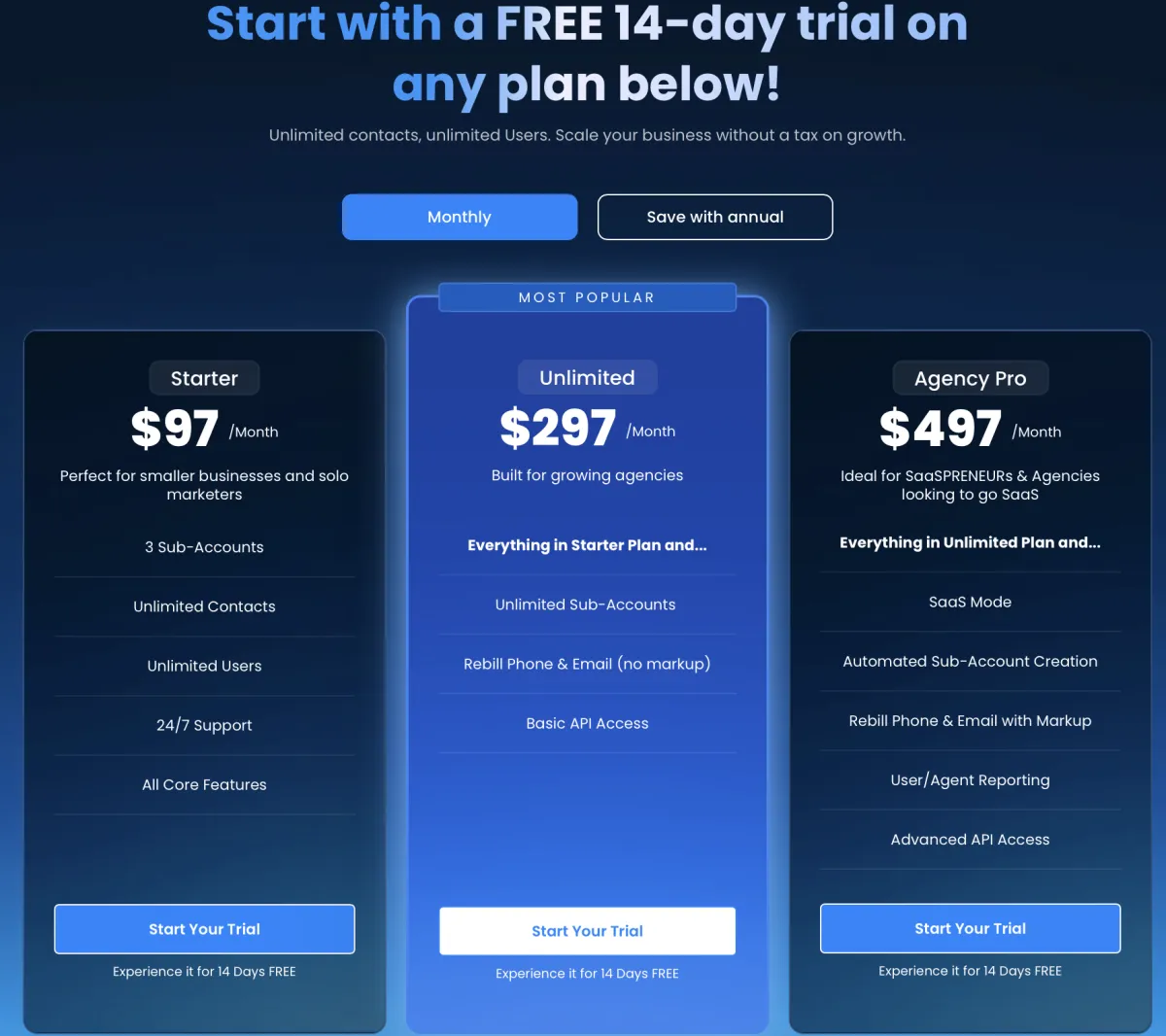
DIY Plan
$197/mo
Best for agents who want to build and manage their own system.
- Conversation AI
- Missed Call Text Back
- AI CRM
- Calendar Booking
- Email & SMS Follow-Up
- Basic Workflows
- Community Training
- Real Estate Knowledge Base(REKB)
- REKB Lifetime Updates
Done-With-You
$397/mo
Best for agents who want coaching, guidance, and faster implementation.
- Everything in DIY
- Voice AI
- Webinar Funnel
- Cash Offer Request System
- AI Appointment Booking
- Personalized ChatGPT Workflows
- Monthly Strategy Session
- Priority Onboarding
- Buyer/Seller Webinar Funnel Slides
Done-For-You
$597/mo
Best for busy agents who want the system built and optimized for them.
- Everything in Done-With-You
- Complete System Setup
- Custom AI Workflows
- Voice AI Customization
- Conversation AI Customization
- CRM Configuration
- Funnel Setup
- Monthly Optimization
- Priority Support
- Customer Journey Customization
Start Your Free 14-Day AI Business Growth Bundle Trial
Experience Voice AI, Conversation AI, Missed Call Text Back, AI CRM, webinar funnels, automated follow-up, and personalized ChatGPT workflows.
Includes a Complimentary Onboarding Session.
Request Your Free TrialHow It Works
We help you move from missed opportunities to a connected AI-powered lead conversion system.
Identify Your Lead Sources
We review where your leads come from: Zillow, Realtor.com, Facebook, website, referrals, Google, or cash offer campaigns.
Install AI Automation
We connect Voice AI, Conversation AI, Missed Call Text Back, CRM workflows, and appointment booking.
Automate Follow-Up
Your system nurtures buyers, sellers, old leads, webinar registrants, and missed-call opportunities automatically.
Book More Appointments
The goal is simple: more qualified conversations, more consultations, and more closed transactions.
Test Drive the AI Demo
Use the chat widget on this page to experience Conversation AI and request a Voice AI demo number.
Built for Real Estate Agents Who Want to Grow Smarter
AI does not replace relationships. It helps agents respond faster, follow up better, and spend more time serving buyers and sellers.
Home Selling & Real Estate Marketing

LAUSD’s New Screen-Time Policy Creates an Opportunity for Educator-Led Innovation
LAUSD’s New Screen-Time Policy Creates an Opportunity for Educator-Led Innovation
The Los Angeles Unified School District’s new student screen-time policy represents a major shift in how schools use technology.
The policy establishes age-appropriate limits, restricts student access to video-streaming platforms on district devices, encourages paper-and-pencil alternatives, and asks schools to consider screen time accumulated across classes and homework.
The goal is understandable: technology should improve learning without replacing teachers, relationships, collaboration, movement, and hands-on experiences.
However, adopting a screen-time policy is easier than implementing one.
The most important practical question may be:
How will a school accurately track each student’s screen time across an entire day?
Sending an Email Is Not the Same as Assigning Screen Time
The LAUSD policy does not appear to prohibit teachers or schools from sending email to students.
An email can be delivered without the student opening it. Once a student reads the message, however, the student is using a screen. That does not necessarily mean a brief administrative email should be treated the same as a 30-minute digital lesson.
Schools will need to distinguish between different types of technology use:
A student reading a brief attendance notice
A student completing an online mathematics assignment
A student watching an instructional video
A student participating in a computer science lesson
A student filling out a digital reflection form
A student passively scrolling or streaming content
LAUSD’s published guidance emphasizes the value and purpose of screen use, not simply the presence of a device. High-value uses include problem-solving, creating, collaborating, communicating, and completing purposeful activities connected to learning.
This distinction is essential. A two-minute tardy notification should not be treated the same as 45 minutes of passive video consumption.
How Could LAUSD Track Screen Time?
LAUSD plans to review its existing systems and develop methods for monitoring student use of district-issued devices.
Schools may be able to collect information from:
Chromebook and tablet activity logs
Student sign-in records
Learning-management systems
District-approved instructional applications
Online assignment records
Application-level usage reports
Schoology activity summaries
Teacher-reported digital assignments
Student, parent, and staff surveys
The district’s resolution also discusses tracking activity during school and after school on district-issued devices, sharing reports with teachers and administrators, and providing families with weekly online-activity information.
These systems can generate useful data, but they cannot provide a perfect measurement.
A device may show that an application remained open for 20 minutes without revealing whether the student was actively working. A browser can track an open email but may not know whether the student read it in 30 seconds and then walked away.
Schools must also decide which class receives responsibility for general activities such as email, attendance notices, school announcements, counseling forms, and digital citizenship lessons.
Technology can estimate screen exposure, but educators will still have to interpret the data.
The Coordination Challenge
Screen time is cumulative.
A single teacher may assign what appears to be a reasonable 20-minute online activity. However, if five other teachers make similar decisions on the same day, the student could accumulate two hours of required screen time before completing homework.
This means implementation cannot be left entirely to individual classrooms.
Schools may need a shared system that helps teachers see:
How much digital work has already been assigned
Which applications students are expected to use
The estimated completion time
Whether the activity is active or passive
Whether a screen-free alternative is available
How much homework-related screen time is expected
Whether students have accommodations through an IEP or 504 plan
This is not simply a compliance problem. It is a school-design problem.
That makes it an ideal challenge for anEducator Innovation Sandbox.
What Is an Educator Innovation Sandbox?
An Educator Innovation Sandbox, or EIS, is a structured environment where teachers and school leaders can identify a real problem, build a small solution, test it with actual users, study the results, and improve it before attempting a schoolwide rollout.
The people closest to the problem help design the solution.
Instead of purchasing another large technology platform before understanding what schools need, educators begin with questions:
What information must be collected?
Who needs to see it?
What decisions will the information support?
What is the simplest possible solution?
How can we test it safely with one grade level, department, or student group?
What evidence will determine whether it works?
The sandbox approach allows schools to learn before they scale.
An EIS Screen-Time Design Challenge
A school could organize a four- to six-week innovation cycle around one design question:
How might we help teachers coordinate meaningful technology use while keeping students within the district’s screen-time guidelines?
A teacher-led design team could include:
Classroom teachers
A school administrator
A counselor
An instructional technology specialist
A special education representative
Students
Parents or guardians
The team could build a simple prototype that records each digital assignment, its estimated duration, its educational purpose, and whether a screen-free option exists.
The first version does not need to be complicated. It might begin as a shared Google Form, spreadsheet, dashboard, or calendar.
Teachers could enter:
Course and grade level
Assignment name
Date assigned
Estimated screen minutes
Digital platform used
Active or passive use
In-class or homework use
Screen-free alternative
Required accommodation or exemption
The prototype could then generate a grade-level dashboard showing the estimated cumulative screen load for each day or week.
Applying the EIS Model to Tardy Communications
Consider a school tardy policy in which consequences increase after the fourth, fifth, eighth, tenth, thirteenth, and fifteenth tardies.
A traditional system might require students to log into a platform, read several pages, watch a video, and complete an online reflection form. That adds screen time without necessarily improving attendance.
An EIS team could redesign the process.
The new system might:
Send the student a brief plain-text notification
Send the detailed notice to the parent or guardian by email or SMS
Create a teacher follow-up task
Offer a printed notice when needed
Record the communication in the school’s attendance system
Provide a face-to-face intervention for repeated tardiness
Reserve digital forms for situations in which they add real value
For example, a fourth-tardy message could say:
You have reached your fourth recorded tardy. Your teacher will contact your parent or guardian. Please speak with your teacher if you believe this notice is incorrect.
The detailed explanation, next steps, and support resources could be sent directly to the parent or guardian.
This approach uses technology to initiate a human intervention rather than allowing technology to become the intervention.
Measure More Than Minutes
A successful screen-time strategy should not focus exclusively on reducing minutes. Schools should also measure whether the redesigned experience improves student outcomes.
An EIS pilot could examine:
Total required screen minutes
Percentage of teachers coordinating digital assignments
Number of assignments offering screen-free alternatives
Student completion rates
Parent communication rates
Teacher workload
Student engagement
Attendance and tardy patterns
Academic performance
Student and family satisfaction
The objective is not to remove technology from education. It is to use technology intentionally.
From District Policy to Teacher-Built Solutions
LAUSD’s policy creates both a challenge and an opportunity.
The challenge is developing a fair and practical system for measuring cumulative screen exposure across different teachers, subjects, devices, applications, homework assignments, and student needs.
The opportunity is to invite educators to design that system.
Teachers understand where technology helps, where it creates unnecessary work, and where a conversation, printed resource, collaborative activity, or hands-on experience would serve students better.
An Educator Innovation Sandbox gives those educators the structure and support to move from observation to action.
The strongest implementation will not come from a screen-time counter alone. It will come from combining useful data with educator judgment, student feedback, parent choice, and intentional instructional design.
That is the promise of the Educator Innovation Sandbox: not simply helping schools comply with a new policy, but helping educators build better systems because of it.
Join the Educator Innovation Sandbox
Is your school trying to reduce tardiness, improve attendance, coordinate technology use, or strengthen parent communication?
The Educator Innovation Sandbox helps teachers and school leaders identify a high-impact challenge, develop a practical prototype, test it on a small scale, and use evidence to decide what should happen next.
Learn more and register for a free workshop at:
www.teachleadandinspire.com/eis
Because the best school innovations are not merely delivered to educators.
They are designed with them.

2026 Modern Real Estate Agent
Do You Want To Do It Yourself ?
Real Estate Agent
Missed Call Text Back - ROI Calculator
Have You Ever Missed A Call That Cost You a Listing or A Sale Because You Didn't Answer Your Phone?
Missed Call Text Back ROI Calculator
See how much money real estate agents may be leaving on the table.
Plug In Your Numbers To See How Much Missed Call-Text Back Can Save You Every Month
Lifetime Value of one customer (or Average Commission per sale)
Enter estimate of how many call you miss per week
Enter Your closing ratio per lead
Hit the calculate button to see how much we can save you
FREE AI Masterclass For Realtors
Stop Buying More Leads.
Start Booking Appointments.
Learn the AI system that generates buyer and seller leads—and turns them into booked consultations without chasing every prospect manually.

The Traditional Lead Model is Broken
Most agents do not have a lead problem; they have a follow-up problem
You’re buying more leads than ever, but your calendar is empty. You spend hours dialing numbers that go straight to voicemail, sending texts that get ignored, and chasing prospects who were never serious in the first place.
Every month, thousands of dollars in ad spend vanish into a black hole of follow-up fatigue. The harder you work, the more the system feels rigged against you. You don't have a traffic problem: you have a conversion problem.
It’s time to stop chasing ghosts and start implementing a predictable appointment engine.
THE MASTERCLASS
What You Will Learn
Master the exact frameworks top producers use to turn raw leads into booked appointments automatically. No fluff, just actionable systems.
How to respond to buyer and seller leads instantly.
How to follow up automatically with SMS and email.
How Conversation AI and Voice AI can help qualify prospects.
How missed call text back recovers lost opportunities.
How to turn buyer and seller leads into booked consultations using one connected system.Bullet List 5
The Appointment Engine
Build an automated system that qualifies and books leads 24/7 without your manual input.
Ghost-Proof Follow-up
Deploy multi-channel touchpoints that guarantee responses from leads who previously went cold.
High-Converting Scripts
Exactly what to say to overcome objections and lock in commitments within the first 5 minutes.
Automated Lead Nurturing
Keep your pipeline warm with sequence frameworks that build trust before you even speak.
Frictionless Scheduling
Remove the friction from booking and increase show-up rates with bulletproof reminders.
HOW IT WORKS
The 6-Step Appointment Engine
The exact roadmap from cold prospect to confirmed calendar booking.
Targeted Lead Capture
Attract high-intent buyers and sellers through optimized, data-driven channels.
Instant Qualification
Automatically filter out tire-kickers so you only spend time on serious prospects.
Automated Value Delivery
Build immediate trust using pre-built, high-value content sequences.
Strategic Follow-Up
Keep leads engaged with a multi-touch sequence without lifting a finger.
Smart Intent Scoring
Identify exactly when a prospect is primed and ready to take action.
Seamless Calendar Booking
Convert warm leads into confirmed appointments directly on your schedule.

🏆 Amazon Future Engineer Teacher of the Year (2023)
🎓 Doctor of Education (Ed.D.)
🇺🇸 Retired U.S. Marine Major
🤖 Certified AI Prompt Engineer
🏡 Real Estate Marketing & AI Automation Specialist
YOUR EXPERT GUIDE
Meet Your Host
Jordan B Smith Jr. Ed.D.
I'm a retired educator, retired Marine Major, Certified AI Prompt Engineer, and GoHighLevel automation strategist.
After spending more than two decades building educational systems and helping organizations improve performance, I began studying the biggest challenge facing today's real estate agents—not just finding and attracting leads, but consistently following up with them.
While working toward my real estate license, I discovered that many of the industry's top coaches and marketing companies were using the same underlying technology to generate appointments. Rather than simply buying more leads, successful agents were building automated systems that captured, nurtured, qualified, and converted prospects into buyer and seller consultations.
Today, I help real estate agents implement those same AI-powered systems using GoHighLevel—including RE buyer & seller webinar funnels, AI Voice Assistants, Conversation AI, automated email and SMS follow-up, CRM automation, and appointment booking.
My mission is simple:
Help real estate agents stop chasing leads and start building predictable systems that turn buyer and seller leads into booked consultations.
He doesn't just teach theory: he provides the exact blueprints working in today's market to completely eliminate follow-up friction.

Jordan B. Smith Jr. Ed.D.
Creator, The Appointment Engine
Ready to Stop Chasing Leads?
FREE MASTERCLASS
Join 2,500+ agents already using the system
© 2026 Annapolis Creed, LLC. dab Teach, Lead, and Inspire All rights reserved.